Editorial comparison · Updated 22 August 2026

The 10 best form builders in 2026

The short answer: choose formformform for fast, privacy-first forms without response limits; Tally for the strongest established free plan; Jotform for breadth; or Typeform for conversational presentation. The right answer changes with the job, so we compared all ten on the limits and trade-offs that matter in practice.

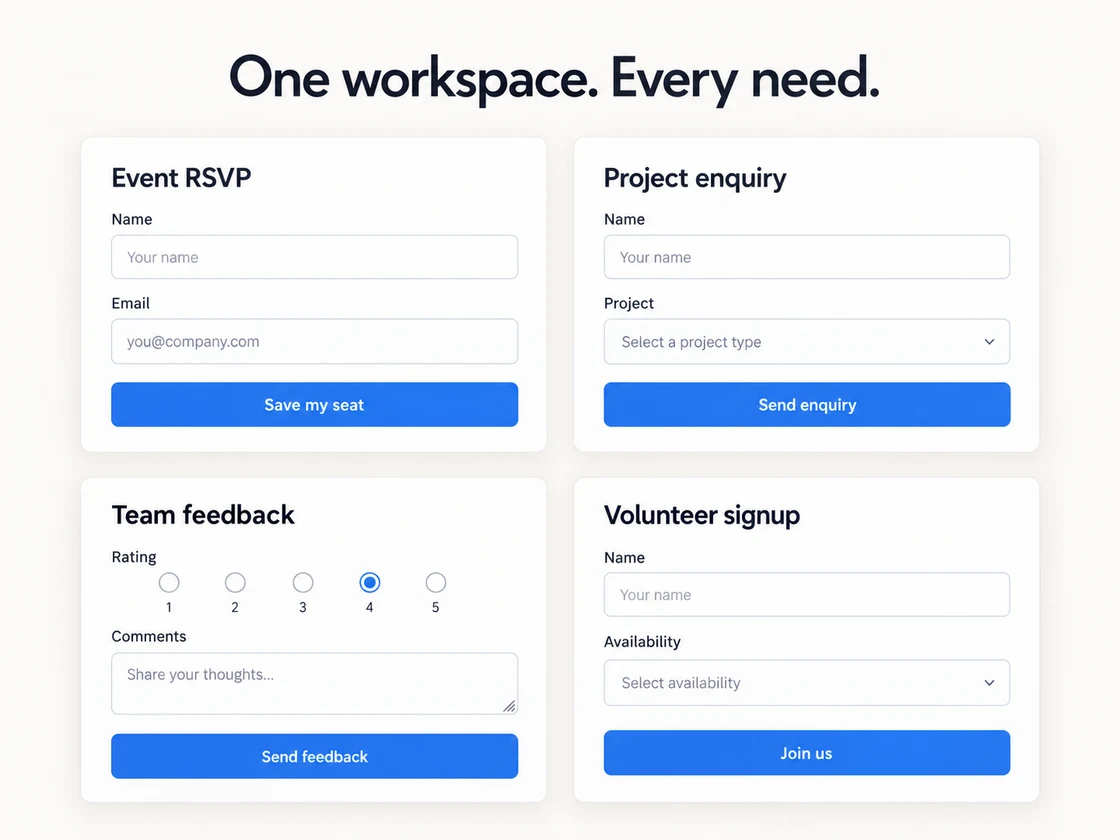
Four different complete forms demonstrate everyday collection tasks in one workspace.
Illustrated formformform exampleChoose for the work you actually need to do.

With formformformA dedicated form for every need, with unlimited responses. Free is for individuals and non-profits.

What to compareCompare response limits, branding, privacy and the workflow after someone submits.

What you get in practice

Compare the work.
Then compare the plans.

Look at the form someone fills in, what happens to their answer, and the room you have to keep collecting.

A form for each job

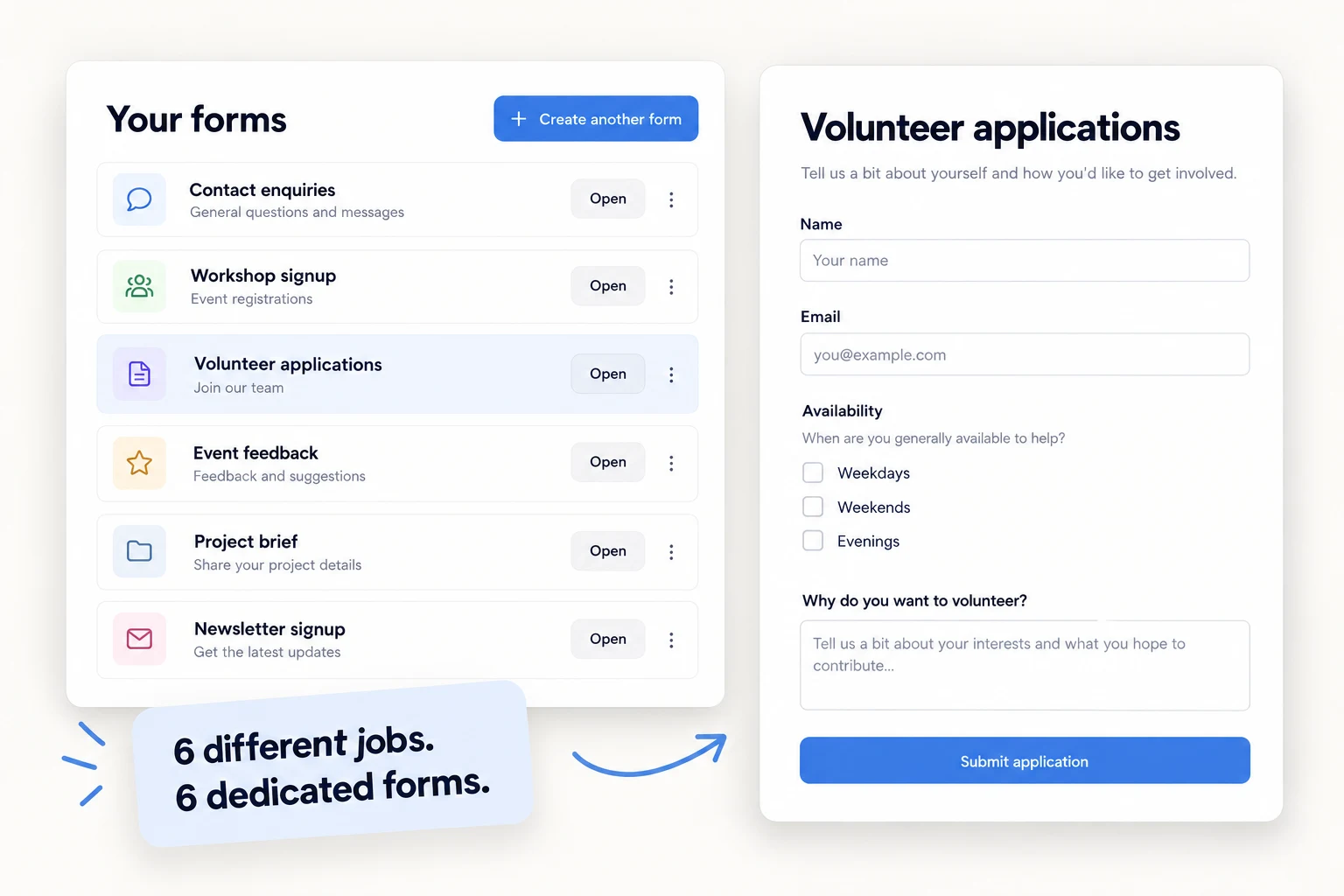
Keep all six forms. Create the seventh.

Separate questions deserve separate forms.

A community project might need an enquiry form, event signup, volunteer application, feedback survey, project brief and newsletter signup. With unlimited forms, there is no need to delete an existing form to make room for the next one.

Compare your complete list of collection tasks against a plan’s form allowance, as well as its response quota. formformform includes unlimited forms and responses; Free is for individuals and non-profits.

Find a template for your next job
Six named forms in a library, a complete volunteer application, and a Create another form action.
Illustrated formformform example. Plan limits checked 23 October 2026.
Built into your workflow

Ask a relevant follow-up, not every possible question.

A better form gives each person a shorter path.

For an event signup, ask about a guest only when someone is bringing one. For an enquiry, show the project questions that fit the selected service. Conditional logic and validation help you collect useful details without making everybody work through the same long questionnaire.

See conditional logic in action
A form branches to relevant follow-up questions based on the selected answer.
Illustrated formformform example.
Built into your workflow

Some answers should be unreadable to the provider.

Choose optional end-to-end encryption for sensitive collection.

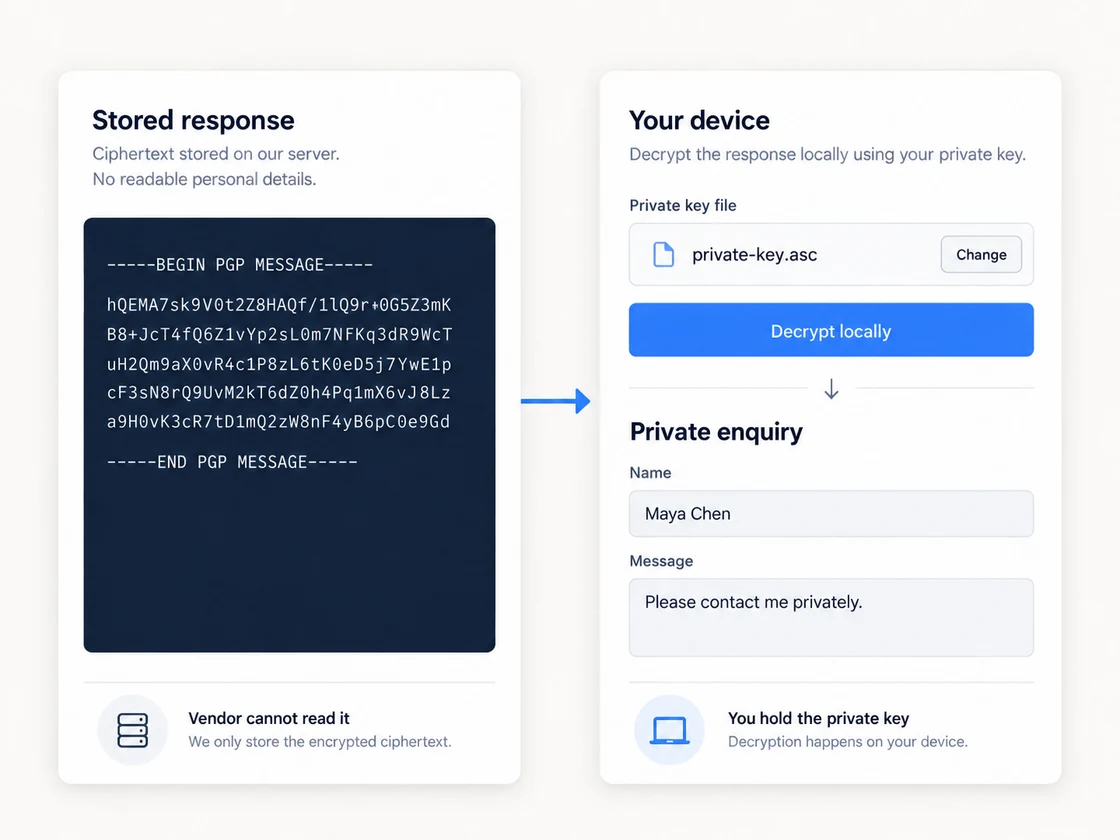
Encryption happens in the respondent’s browser before the submission is uploaded. Our server stores ciphertext. You keep the private key and decrypt locally on your device. This is a different privacy model from encrypting a database that the provider can still read. Keep the key safe: we cannot recover it for you.

Follow a response through encryption
Ciphertext is decrypted on the owner’s device using a privately held key.
Illustrated formformform example.
Built into your workflow

Let a submission start the next job.

Connect the tools you already use.

Use the API to create forms or read responses, and webhooks to send submission events to your own endpoint. Through Zapier, a new enquiry can create a record in another tool or notify a channel. These are explicit connections you configure; external services can have their own plans and fees.

Explore the API and webhooks
A form submission is sent as a webhook payload to a configured endpoint.
Illustrated formformform example.
Disclosure: formformform publishes this comparison and appears in it. We check competitors’ published pricing, show where each one wins, and separate verified plan facts from our editorial judgement. Prices are in USD and may vary by billing cycle, region or promotion.

At a glance

Start with your use case, then check the response allowance. “Free” can mean anything from 10 responses to unlimited collection.

Scroll to compare every column →

#BuilderBest forFree planPaid from
1formformformFast, privacy-first formsUnlimited; individuals and non-profits$19/mo
2TallyThe most generous established free planUnlimited, subject to fair use$29/mo
3JotformTemplates and all-in-one workflows5 forms; 100 submissions/mo$34/mo billed annually
4TypeformConversational lead forms10 responses/mo$39/mo
5FilloutDatabase-connected forms1,000 responses/mo$19/mo billed annually
6Google FormsQuick internal formsFree with a Google accountIncluded with Workspace
7PaperformBranded forms and mini landing pages30 submissions/mo$24/mo billed annually
8Cognito FormsCalculations, payments and approvalsUnlimited forms; 100 entries/mo$24/mo
9Zoho FormsTeams already using Zoho3 forms; 500 submissions/moVaries by region
10FormstackEnterprise forms and document workflows14-day trial$99/mo ($83 annually)

Pricing checked 22 August 2026. “Paid from” uses monthly billing unless the row says annually.

The top 10, reviewed

#1 · Best overall

formformform

Fast, privacy-first forms

A focused form builder with a document-style editor, conditional logic, lightweight embeds, API access and unlimited responses on the free plan for individuals and non-profits.

What stands out
  • ✓Unlimited forms and responses
  • ✓EU hosting and encrypted-form option
  • ✓Pro at $19/month or $15/month billed yearly
The trade-off

A newer product, so its template and integration catalogues are smaller than long-established suites.

Free: Unlimited; individuals and non-profitsPaid: $19/moChecked against formformform pricing
#2 · Best free alternative

Tally

The most generous established free plan

Tally feels like writing a document and includes logic, calculations, payments, signatures and file uploads without a response cap.

What stands out
  • ✓Unlimited free submissions
  • ✓Strong free feature set
  • ✓EU-based and GDPR focused
The trade-off

Removing Tally branding, custom domains and team collaboration require Pro.

Free: Unlimited, subject to fair usePaid: $29/moChecked against Tally pricing
#3 · Best all-round suite

Jotform

Templates and all-in-one workflows

Jotform combines a mature form builder with payments, approvals, e-signatures, apps and a very large template library.

What stands out
  • ✓Broadest feature range
  • ✓Payments and signed documents
  • ✓Large integration and template ecosystem
The trade-off

The free plan is tightly capped, and the breadth of the interface can feel heavy for simple forms.

Free: 5 forms; 100 submissions/moPaid: $34/mo billed annuallyChecked against Jotform pricing
#4 · Best conversational UX

Typeform

Conversational lead forms

Typeform popularised polished, one-question-at-a-time forms and remains a strong choice when presentation and guided completion matter most.

What stands out
  • ✓Polished respondent experience
  • ✓Logic on the free plan
  • ✓Strong marketing integrations
The trade-off

Ten free responses per month is only enough to test; meaningful volume and brand removal get expensive.

Free: 10 responses/moPaid: $39/moChecked against Typeform pricing
#5 · Best for Airtable and Notion

Fillout

Database-connected forms

Fillout is especially capable when a form needs to read from and write back to Airtable, Notion, Google Sheets or another operational data source.

What stands out
  • ✓Generous free response allowance
  • ✓Powerful database integrations
  • ✓Scheduling and payment features
The trade-off

Its deepest advantages matter most when your workflow already revolves around a supported data source.

Free: 1,000 responses/moPaid: $19/mo billed annuallyChecked against Fillout pricing
#6 · Best for simple collection

Google Forms

Quick internal forms

Google Forms is familiar, quick and tightly connected to Sheets. It is hard to beat for a basic internal survey, RSVP or classroom quiz.

What stands out
  • ✓No separate subscription
  • ✓Instant Sheets connection
  • ✓Simple collaboration
The trade-off

Design control, workflow depth, payments and customer-facing branding are limited.

Free: Free with a Google accountPaid: Included with WorkspaceChecked against Google Forms help
#7 · Best design flexibility

Paperform

Branded forms and mini landing pages

Paperform blends forms with editorial pages, product catalogues, bookings and payments, making it a good fit for design-led small businesses.

What stands out
  • ✓Flexible page-like layouts
  • ✓Payments and appointments
  • ✓Strong visual customisation
The trade-off

The free plan excludes analytics, API access and webhooks and allows only 30 monthly submissions.

Free: 30 submissions/moPaid: $24/mo billed annuallyChecked against Paperform pricing
#8 · Best for operational forms

Cognito Forms

Calculations, payments and approvals

Cognito Forms handles calculated quotes, repeating sections, documents, payments and multi-step business processes particularly well.

What stands out
  • ✓Advanced calculations
  • ✓Payments on every plan
  • ✓Workflow and compliance options
The trade-off

The interface prioritises function over visual polish, and approvals start on the Team plan.

Free: Unlimited forms; 100 entries/moPaid: $24/moChecked against Cognito Forms pricing
#9 · Best Zoho ecosystem fit

Zoho Forms

Teams already using Zoho

Zoho Forms offers capable rules, payments, mobile collection and direct connections across Zoho CRM, Desk, Campaigns and the wider suite.

What stands out
  • ✓Deep Zoho integrations
  • ✓Offline mobile collection
  • ✓Payments and webhooks on free
The trade-off

The three-form free limit is restrictive, and it is less compelling outside the Zoho ecosystem.

Free: 3 forms; 500 submissions/moPaid: Varies by regionChecked against Zoho Forms pricing
#10 · Best enterprise workflow

Formstack

Enterprise forms and document workflows

Formstack is aimed at organisations that need secure data collection, approvals, generated documents, e-signatures and managed enterprise deployment.

What stands out
  • ✓Forms, documents and signatures
  • ✓Approval workflows
  • ✓Enterprise security and support
The trade-off

There is no permanent free plan, and pricing is difficult to justify for individuals or lightweight use cases.

Free: 14-day trialPaid: $99/mo ($83 annually)Checked against Formstack pricing
How we chose

This is a practical editorial ranking, not a market-share table. We started with products that recur across current form-builder roundups, then assessed the criteria that most often change a buying decision.

Value

Free-plan usefulness and real cost at modest response volume.

Building

Editor speed, logic, calculations, templates and flexibility.

Publishing

Brand control, embeds, custom domains and respondent experience.

Operations

Integrations, exports, payments, collaboration and workflows.

Trust

Privacy options, security posture, data controls and transparency.

Fit

Whether the product is distinctly better for a common real-world job.

Quick answers

What is the best free form builder?

formformform Free provides unlimited forms and responses for individuals and non-profits. Tally also offers unlimited collection under its fair-use policy. Google Forms is also free and works well for simple internal collection.

What should I compare before choosing?

Check response and storage caps, logic, branding, integrations, data location, exports and the price at your likely volume—not just the headline monthly fee.

Build your first form while it’s free

Unlimited forms and responses. No credit card required.

Try formformform

Ask AI about formformform

See what it does, who it’s for, and whether it fits your needs.

Opens with product context and a link to this page.

View or copy the prompt