Jotform alternative with no form or submission limits
Jotform's free plan gives you 5 forms and 100 submissions per month. Hit any single cap — forms, submissions, or storage — and you're forced to upgrade at $34-39/mo, even if the other limits are fine. formformform has no caps on either. Unlimited forms, unlimited responses, free for individuals and non-profits.
Illustrated formformform exampleKeep the signup open after the first 100 RSVPs.
With formformformUnlimited responses let the same form serve the whole event. Free is for individuals and non-profits.
What to compareJotform Starter includes 100 monthly submissions and five forms.
Plan reference: Jotform pricing · checked 23 October 2026.
What you get in practice
Compare the work. Then compare the plans.
Look at the form someone fills in, what happens to their answer, and the room you have to keep collecting.
A form for each job
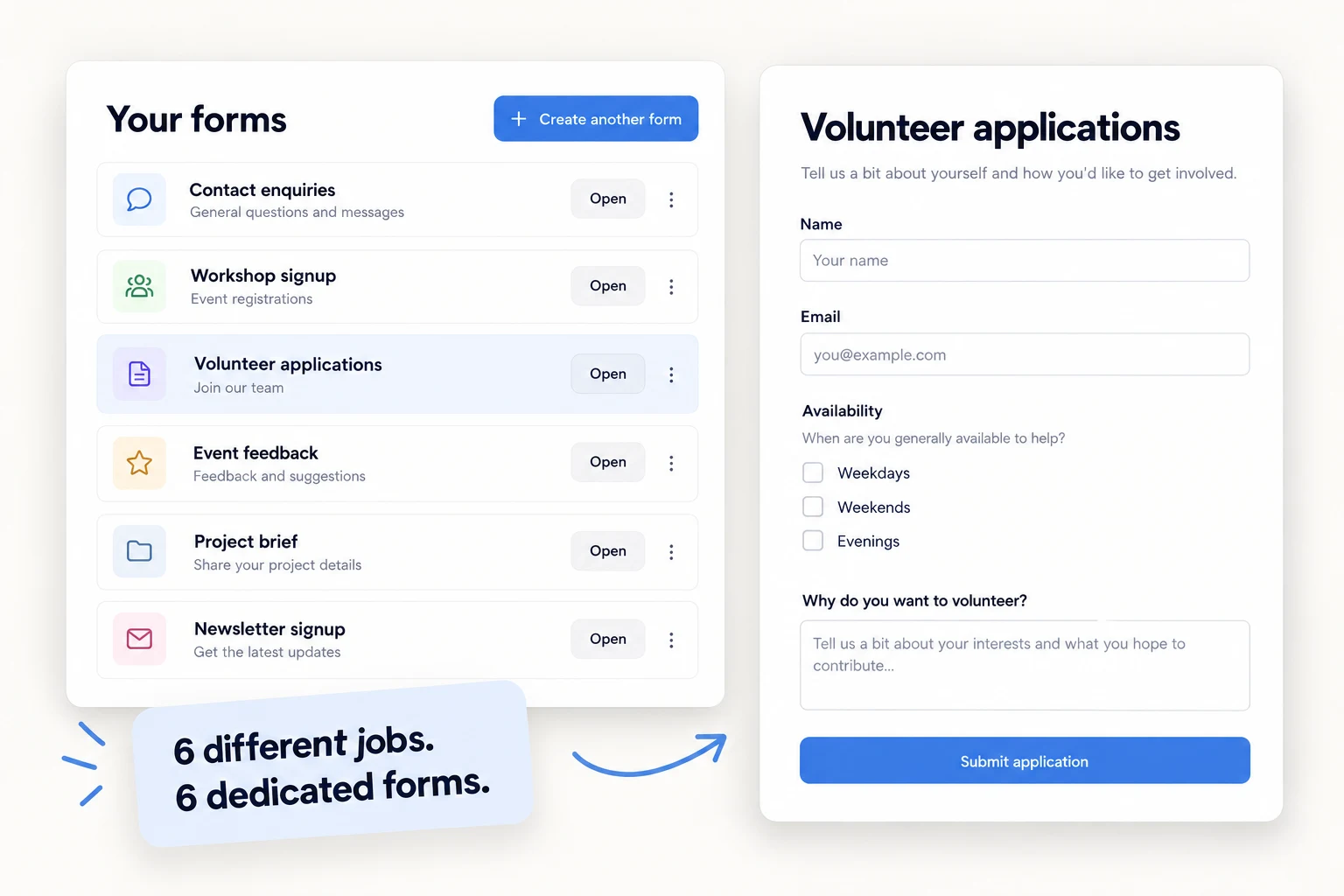
Keep all six forms. Create the seventh.
Separate questions deserve separate forms.
A community project might need an enquiry form, event signup, volunteer application, feedback survey, project brief and newsletter signup. With unlimited forms, there is no need to delete an existing form to make room for the next one.
Jotform Starter lists five forms. This six-form example exceeds that plan’s form allowance. formformform Free includes unlimited forms for individuals and non-profits; Pro is for businesses.
Illustrated formformform example. Plan limits checked 23 October 2026.
Built into your workflow
Ask a relevant follow-up, not every possible question.
A better form gives each person a shorter path.
For an event signup, ask about a guest only when someone is bringing one. For an enquiry, show the project questions that fit the selected service. Conditional logic and validation help you collect useful details without making everybody work through the same long questionnaire.
A submitted form should become something you can use.
Find the answer, keep its context, and take the next step.
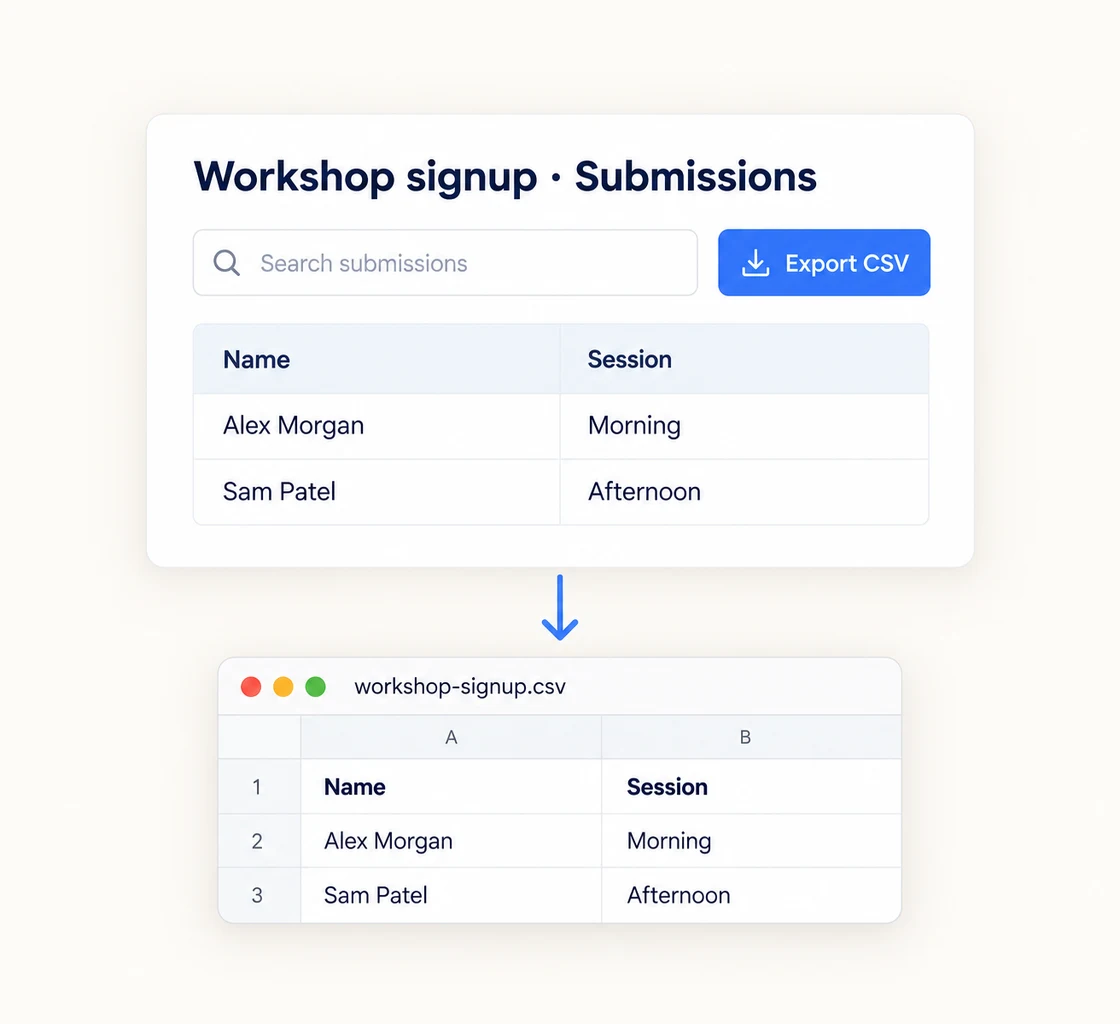
Review a complete submission, search for a response and export your data as CSV. For a workshop, that gives you the details needed to prepare an attendance list. For feedback, it keeps written comments alongside the answers they explain. Unlimited collection is useful because you can keep working with the results.
Use the API to create forms or read responses, and webhooks to send submission events to your own endpoint. Through Zapier, a new enquiry can create a record in another tool or notify a channel. These are explicit connections you configure; external services can have their own plans and fees.
Jotform free: 5 forms, 100 submissions/month. formformform Free: unlimited forms and submissions for individuals and non-profits. No cap matrix to navigate.
$19
Custom branding at $19/mo
formformform Pro adds custom branding, brand removal and a custom domain for $19/month or $180/year. Team workspaces are planned and are not currently included as a working feature.
UI
Modern, fast editor
Build your questions, set field properties and preview the finished form. Compare the editing workflow with the complexity of the forms you actually need.
The Jotform cap matrix problem
Jotform's free plan has three independent limits: forms (5), submissions/month (100), and storage. Hitting any one of them forces you to upgrade — even if the others are fine. A startup with 4 active forms and 150 monthly responses has to pay $34-39/mo for a Bronze plan, even though they're well within the other caps.
formformform has no cap on forms or responses. Upload limits are separate: fields accept files up to 2 MB each. Check the current plan’s storage allowance on the pricing page.
Pricing comparison
Jotform's pricing scales with usage volume across multiple dimensions. Here's a direct comparison:
Scroll to compare every column →
Plan
formformform
Jotform
Free tier
Individuals and non-profits; unlimited forms and responses
Jotform pricing sourced from jotform.com/pricing (verified June 2026). formformform Pro costs $19/month, or $15/month billed yearly.
Feature comparison
Scroll to compare every column →
Feature
formformform · Free
Jotform · Free
Unlimited forms
Included
5 only
Unlimited responses
Included
100/month
Custom branding
Pro
Paid only
Remove watermark
Pro
Paid only
Webhooks
Included
Included
Custom domain
Pro
Paid only
Team workspaces
Planned
Enterprise only
Email notifications
Included
Included
Conditional logic
Included
Included
File uploads
2 MB/file
Limited storage
Analytics & insights
Included
Basic only
API access
Included
Included
Embed anywhere
Included
Included
GDPR compliant
Included
Included
Jotform free plan limited to 5 active forms and 100 monthly submissions. Hitting any single cap forces an upgrade to Bronze ($39/mo) even if other limits aren't reached.
Where each tool wins
formformform is stronger when you need
✓Unlimited forms and submissions on every plan
✓A focused editor with editable fields and conditional logic
✓Custom domains and branding on Pro
✓Custom branding and watermark removal on the Pro plan ($19/month)
✓A cleaner, more contemporary form design out of the box
✓Affordable path to paid without multiple cap dimensions
Jotform is stronger when you need
→A large template gallery covering many use cases
→Built-in payment collection via Stripe, PayPal, and other gateways
→HIPAA compliance on Gold tier ($99/mo annual)
→Heavy data workflows with Jotform Tables
→AI Agents feature on all paid plans
→A longer time on the market, if vendor history matters to procurement
Moving from Jotform
Bring your forms and their responses with you
Paste a read-only API key from your Jotform account and formformform lists every form in it. Pick the ones you want and each is rebuilt as a formformform form, with its responses and their original dates. Fields, page breaks, images, your thank-you text and every submission come over, including uploaded files. Standard, EU Safe and HIPAA accounts are all supported.
Your Jotform account is only read, never changed, so your old forms keep working until you switch your links.
The key is used for that one import and deleted when it finishes.
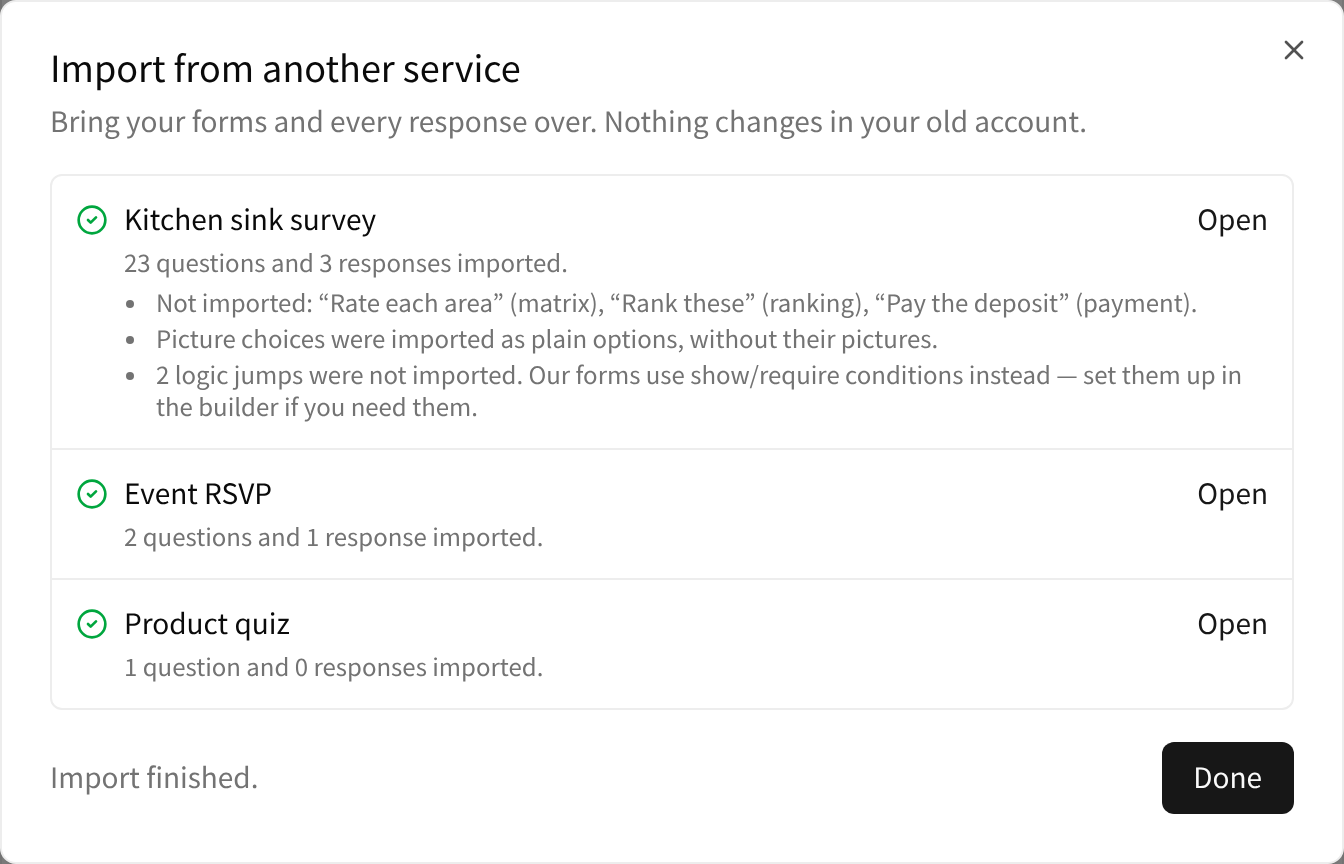
Anything that can't be rebuilt, such as logic rules or payment questions, is named in the summary instead of disappearing.
Run it again later to pick up responses that arrived in the meantime, without duplicates.
The import summary: one line per form, with anything that couldn't be rebuilt named.
Why teams leave Jotform
Caps that force upgrades before you're ready
5 forms and 100 monthly submissions is a tight ceiling for any real project. Hitting it — on any dimension — means $34-39/mo even if you're fine on the other two limits. formformform does not cap form or response counts; upload and plan restrictions still apply.
Editor performance
Try adding fields, editing labels and applying conditional logic in each editor. Compare the workflow with a real form before committing to a platform.
Check current team capabilities
formformform supports individual form management today. Team workspaces are planned. If shared editing and multi-user administration are essential now, compare the available team features before choosing.
Design that looks current
Jotform's default form aesthetic is functional but dated. formformform forms look clean and modern by default — no extra design work needed to get a result you're proud to share.
The honest verdict
Pick formformform if you need
Unlimited usage without navigating a cap matrix, a modern-looking editor that stays fast, and Pro branding and custom domains. Also the right call if you want cleaner-looking forms without heavy template customisation.
Pick Jotform if you need
HIPAA compliance for regulated industries, a broader choice of specialist payment gateways, a large template gallery to pick from, or Jotform Tables for managing submission data in a spreadsheet-like interface without exporting CSVs.
Frequently asked questions
Is there a free alternative to Jotform with no submission limits?
Yes. formformform Free is for individuals and non-profits, with unlimited forms and monthly submissions — no caps on either. Jotform's free Starter plan limits you to 5 active forms and 100 submissions per month. formformform removes both of those constraints.
Why does Jotform force upgrades so quickly?
Jotform has multiple independent caps: forms, submissions per month, and storage. Hitting any single cap triggers a mandatory upgrade even if you're within the other limits. A team with 6 forms but only 50 monthly submissions still has to pay for Bronze ($39/mo) just to have a 6th active form.
Does formformform support HIPAA like Jotform Gold?
No. formformform does not currently offer HIPAA Business Associate Agreements. If HIPAA compliance is a hard requirement for your use case (healthcare data, medical forms), Jotform Gold ($99/mo annually) or a dedicated HIPAA-compliant platform is the right choice.
Can formformform replace Jotform for payment forms?
Yes. Add products and priced options to a form, connect Stripe, PayPal, or Square, and send customers to secure hosted checkout after submission. Payment status is tracked alongside each response. Jotform remains a better fit only when you need one of its additional specialist gateways.
How do I migrate my forms from Jotform to formformform?
Use the import. Create a free account, choose New Form → Import → Jotform, and paste a read-only Jotform API key (Standard, EU Safe and HIPAA accounts are supported). The forms you pick are rebuilt with their submissions, original dates and uploaded files; conditions and fields without an equivalent are listed so you can set them up again. Then update your share links or embeds. The step-by-step guide is at formformform.com/help/import-from-jotform.
Does formformform have templates like Jotform?
formformform includes a growing template library. Jotform's template gallery is larger — if templates are your primary workflow and you need a form for a very specific niche, Jotform's template breadth may cover it.