Connect your forms to Zapier
A catering firm taking event enquiries wants each one in the shared quotes sheet and in the kitchen's Slack channel before anyone has read it. Zapier does that carrying. formformform supplies the starting gun — a submission — and Zapier's own apps take it from there.
The connection has one trigger, New Submission, and it is instant: a Zap subscribes to a specific form, and the submission is pushed out as it lands rather than picked up on a polling schedule. Movement runs one way. A submission sets off an action somewhere else; nothing in Zapier writes back into a form.
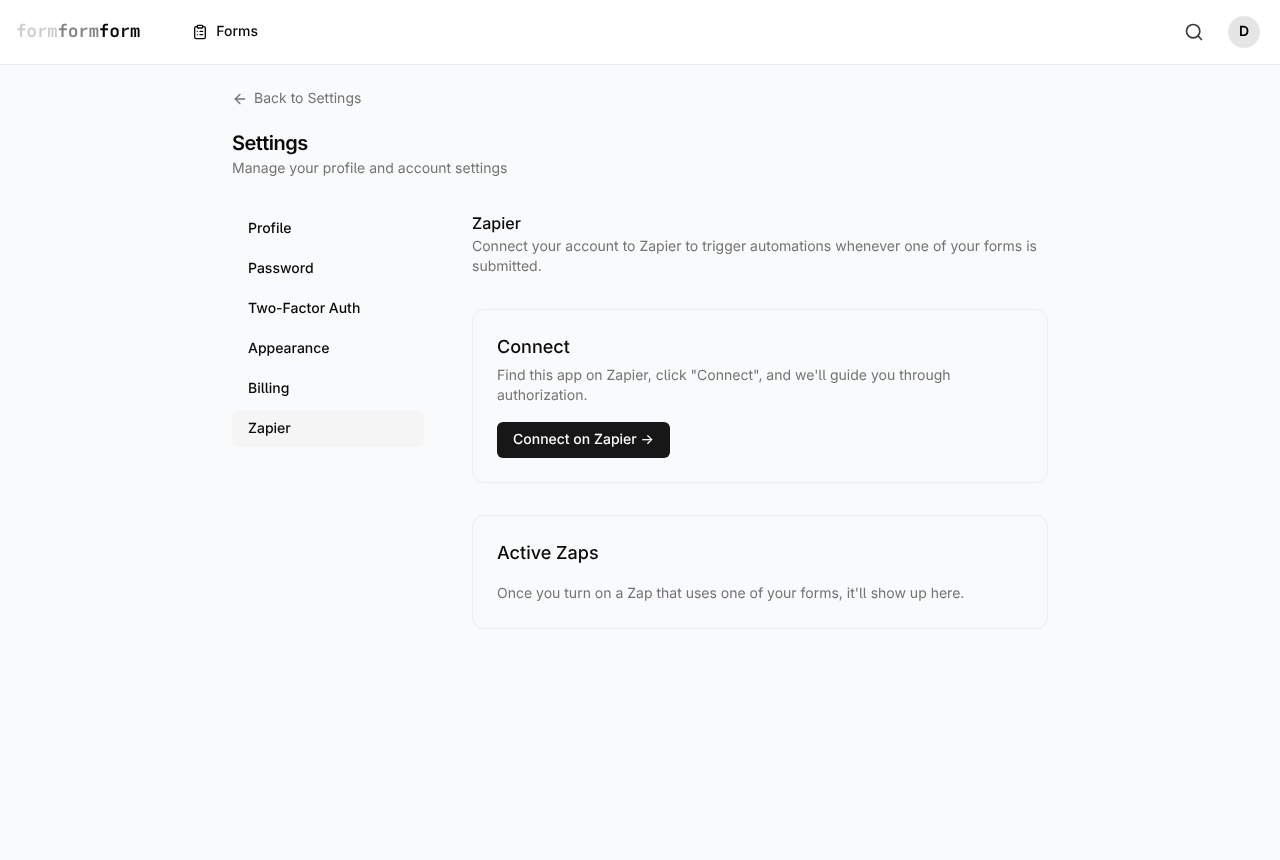
Authorise your account once
Authorisation is per account, not per form. Do it once and every form you own becomes selectable inside Zapier; you choose which one a given Zap watches later.
- 1
Open Settings from the account menu in the top right.
- 2
Choose Zapier in the settings list — it sits under Profile, Password, Two-Factor Auth, Appearance and Billing.
- 3
In the Connect panel, click "Connect on Zapier →". The app page opens in a new tab.
- 4
On Zapier, click Connect and sign in to formformform if you are not already signed in.
- 5
Approve the access Zapier asks for: read your forms, read your submissions, and manage its own subscriptions.
- 6
You land back on Zapier with the account connected. Active Zaps in formformform stays empty until a Zap is switched on.
Zapier needs to reach your account over the public internet. A self-hosted instance on a private network cannot complete the authorisation.
Point the New Submission trigger at a form
Create a Zap on Zapier and search for formformform. New Submission is the only trigger, so there is nothing to weigh up. Under it, a form dropdown lists the forms on your account, newest first — pick the one the Zap should watch.
Every submission to that form fires it, no matter how it arrived: the shared link, a QR code, an embed, a popup. Turning the Zap on subscribes it; turning the Zap off unsubscribes it.
One Zap watches one form. A second form needs a second Zap. If Zapier does not answer, delivery is retried three times and then given up on for that submission.
Map the fields
Each submission arrives as one flat record. Six keys are always there — id, submitted_at, form_id, form_public_id, form_title and form_slug — followed by one key per answer field, taken from the field's own label in lower case with underscores. "Event date" becomes event_date. Two fields sharing a label get a numbered suffix on the second.
formformform hands Zapier the field list as soon as you pick the form, so the whole record is mappable before you run a test. Headings, paragraphs, dividers, images, page breaks and submit buttons collect no answer and never appear. Hidden fields do collect one, so a hidden field capturing utm_source arrives like any other value.
The key follows the label. Rename a question after the Zap is live and its key changes with it, leaving the old mapping pointing at nothing — re-map the step after any rename.
Uploads and encrypted forms
A File Upload field — the single type in the palette's Upload section — sends the stored file's identifier, not the file itself. A Zap can record that something was attached, but it cannot hand the bytes to Google Drive or Dropbox. Download or preview the file from the Submissions tab of the form instead, where it stays owner-only.
An encrypted form gives Zapier even less, by design. The answers are encrypted in the respondent's browser, so the only output field is Encrypted Payload (PGP): one opaque blob. Zapier has no key and cannot open it. Anything that needs field-by-field automation has to run on an unencrypted form.
Uploads are capped at 2 MB per file. On an encrypted form the uploaded bytes are ciphertext too, and only your browser can turn them back into a document.
See what is live, and stop it
Two screens list running subscriptions. Settings → Zapier groups them all by form. Inside a single form, the Settings tab has an Integrations sub-tab — alongside General, After Submission, Notifications and Encryption — with "Active Zaps for this form" and the same connect button.
Each row shows the Zapier address it delivers to and a Revoke button. Revoking confirms first, then stops delivery straight away. It is the blunt end of the same switch as turning the Zap off in Zapier.
Revoking here removes the subscription on our side only. Zapier still shows the Zap as on, so switch it off and on again there to resubscribe.
Frequently asked questions
Is there a formformform action in Zapier, or only a trigger?
Only a trigger. New Submission starts a Zap; there are no formformform actions and no searches, so no Zap can create a form, edit a submission or push anything back in. The traffic runs one way, out of a submission.
How long after someone submits does the Zap run?
Seconds. The trigger is instant rather than polled — Zapier is pushed each submission as it is saved, so there is no wait for a schedule to come round. A slow or unreachable Zapier is retried three times.
Can a Zap save an uploaded file to Google Drive?
No. The trigger passes the identifier of the stored file, not the file itself, so an action app has nothing to save. Download it from the Submissions tab of the form. Each file is capped at 2 MB.
Related articles
- Send submissions to a webhook
Point a form at a URL you own and every submission is posted to it as JSON, signed if you want it signed.
- Using the REST API
Create a key in Settings, then build and edit forms or read responses from your code or AI agent.
- Read and search your responses
Every response lands in the form's Submissions tab, where you can search it and open any one of them in full.
- Hidden fields and prefilled values
Tag each response with where it came from, and start visible fields off with a value already in the box.
Nothing here answering your question? The editor is quick enough that trying it is often faster than reading about it.
Open the editor