Plans and billing
formformform offers Free, Pro, and Business plans. Pro costs $19 per month or $15 per month billed yearly ($180 per year). Upgrade through Settings → Billing.
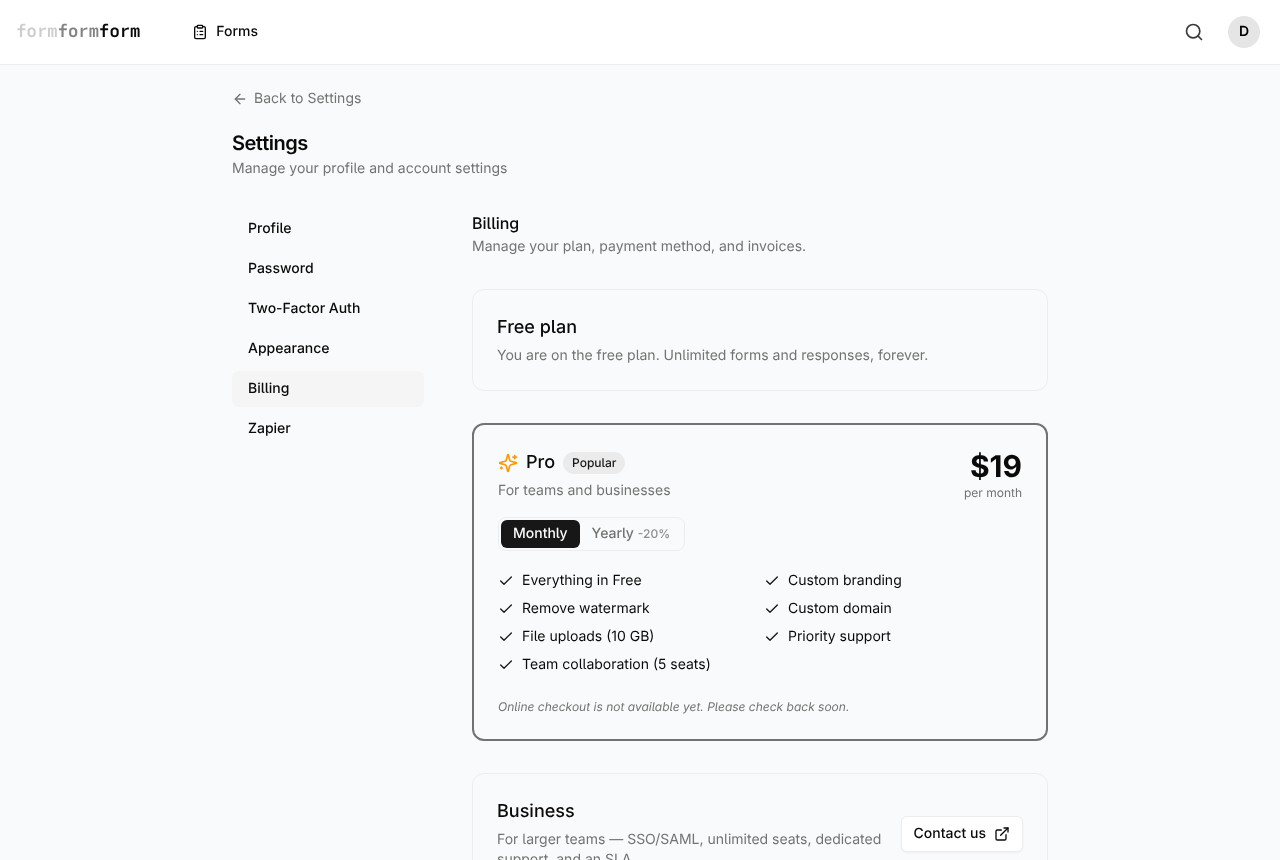
The billing screen shows your current plan, available upgrades, and subscription status. Free accounts can continue collecting responses without a subscription.
Find the billing screen
Billing belongs to your account, not to a single form. The tabs across a form — Fields, Submissions, Settings, Danger — only ever configure that one form, so there is nothing plan-related to look for in the editor.
- 1
Click your avatar in the top right of the app.
- 2
Choose Settings.
- 3
Under the General group, open Billing.
- 4
Read the first card. It names your plan — "Free plan" on most accounts — and the Active badge beside it appears only on Pro.
- 5
Use the settings sidebar to move on to Profile, Password, Two-Factor Auth, Appearance or Zapier.
The Settings hub also lists API Keys and Notifications. Both are marked Coming soon and do not open.
What the free plan covers
The current-plan card puts it plainly: unlimited forms and responses, forever. No metered submission count, and no month in which a form stops accepting answers because a quota ran out.
The Free plan includes core form features such as conditional logic, email notifications, webhooks, API access, and integrations. Pro adds custom branding, watermark removal, custom domains, and team features.
The Forms screen carries a usage meter reading "N of 10 forms used" with an Upgrade link beside it. It shows the free plan's stated form figure. Use the Upgrade link to view Pro pricing and features.
What Pro adds, and what it costs
The Pro card lists the paid features: custom branding, removing the watermark, a custom domain, a larger file upload allowance, priority support and team collaboration for five seats. The interval toggle switches between Monthly at $19 a month and Yearly at $15 a month, billed yearly ($180 per year).
The Business card sits at the foot of the page for larger teams — SSO and SAML, unlimited seats, dedicated support and an SLA. It has no price and no checkout; the Contact us button opens a conversation in a new tab.
One line on the Pro list is easy to misread. "File uploads (10 GB)" is about allowance, not access: the File Upload field lives in the Upload section of the editor palette on every account today.
Choose Monthly or Yearly, then use the upgrade button to open secure Stripe Checkout. Once you have a subscription, Manage billing opens the billing portal for invoices and payment methods.
Removing the formformform branding
Public forms on a free account end with a small "Powered by formformform" footer. The editor draws it too, at the bottom of the form, so you always see what a respondent sees.
Clicking that footer inside the editor does not open the marketing site. It opens a dialog headed Remove the branding, offering Maybe later and Upgrade to remove — the latter drops you on the billing screen. On an encrypted form the branded footer is replaced by the encryption footer, which shows the form's key fingerprint instead.
The footer is enforced on the server for free accounts. Switching it off in a form's Settings tab does not stick — the save quietly turns it back on.
Closing the account
Manage an active subscription through Settings → Billing before deleting your account. Settings → Profile holds your name and email at the top, and Delete account at the bottom. The dialog asks for your password before it will proceed.
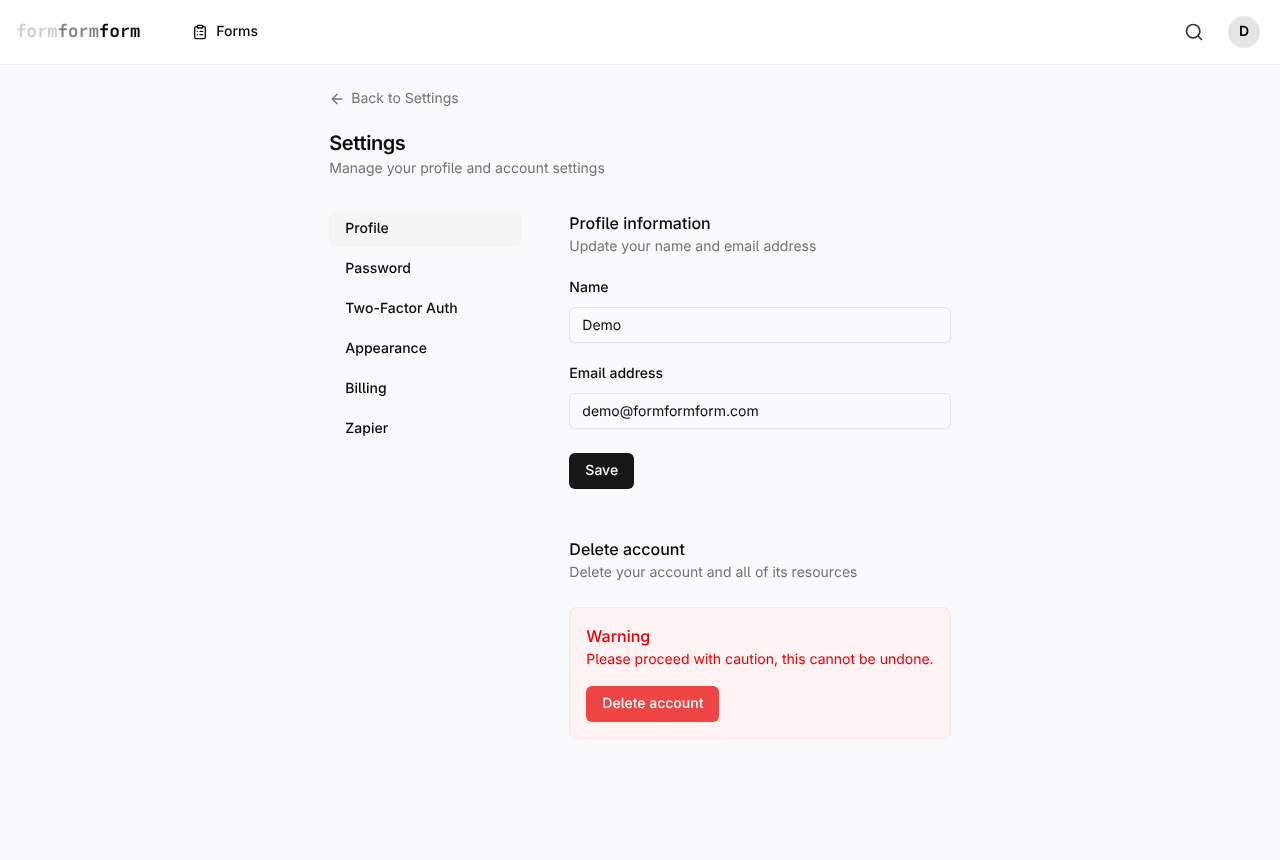
Deletion is an erasure, not a deactivation: your forms, every submission on them and the files respondents uploaded all go with the account, and live form links stop working immediately. Export anything you still need first.
Frequently asked questions
Will I be charged automatically on the Free plan?
No. The Free plan has no subscription charge. To use Pro, choose a billing interval and complete checkout. Your paid subscription then renews at that interval until canceled.
Do I need a paid plan to collect file uploads?
No. File Upload sits in the Upload section of the palette on every account, capped at 2 MB per file, and on an encrypted form the file is encrypted in the respondent's browser before it is sent. The "File uploads (10 GB)" line on the Pro card refers to a larger allowance, not to switching the field on.
Can I take payments from people filling in my form?
Yes. Add products and priced options to the form, then collect payment through secure hosted checkout with Stripe, PayPal, or Square. Payment status is tracked alongside the response.
Related articles
- Turn on two-factor authentication
Add a six-digit code from an authenticator app to your login, and keep the recovery codes that get you back in.
- Collect file uploads
Add a File Upload field, then preview or download whatever people attach from the submission page.
- Export responses to CSV
Download every response to a form as one CSV file, and know what each column holds before you open it.
- How encrypted forms work
Responses are sealed in the visitor's browser with OpenPGP and opened only by a private key you hold.
Nothing here answering your question? The editor is quick enough that trying it is often faster than reading about it.
Open the editor