Print a QR code for your form
A QR code turns a flat printed surface into a way in — a card by the till, a sticker on the side of a vending machine, a laminated sheet on a village hall noticeboard. Someone points a phone at it and your form opens in the browser.
The code is drawn in your browser from the form's public link, and it holds that address directly rather than a redirect through a tracking service. Nothing to register, nothing to renew, no third party sitting between the scan and the form.
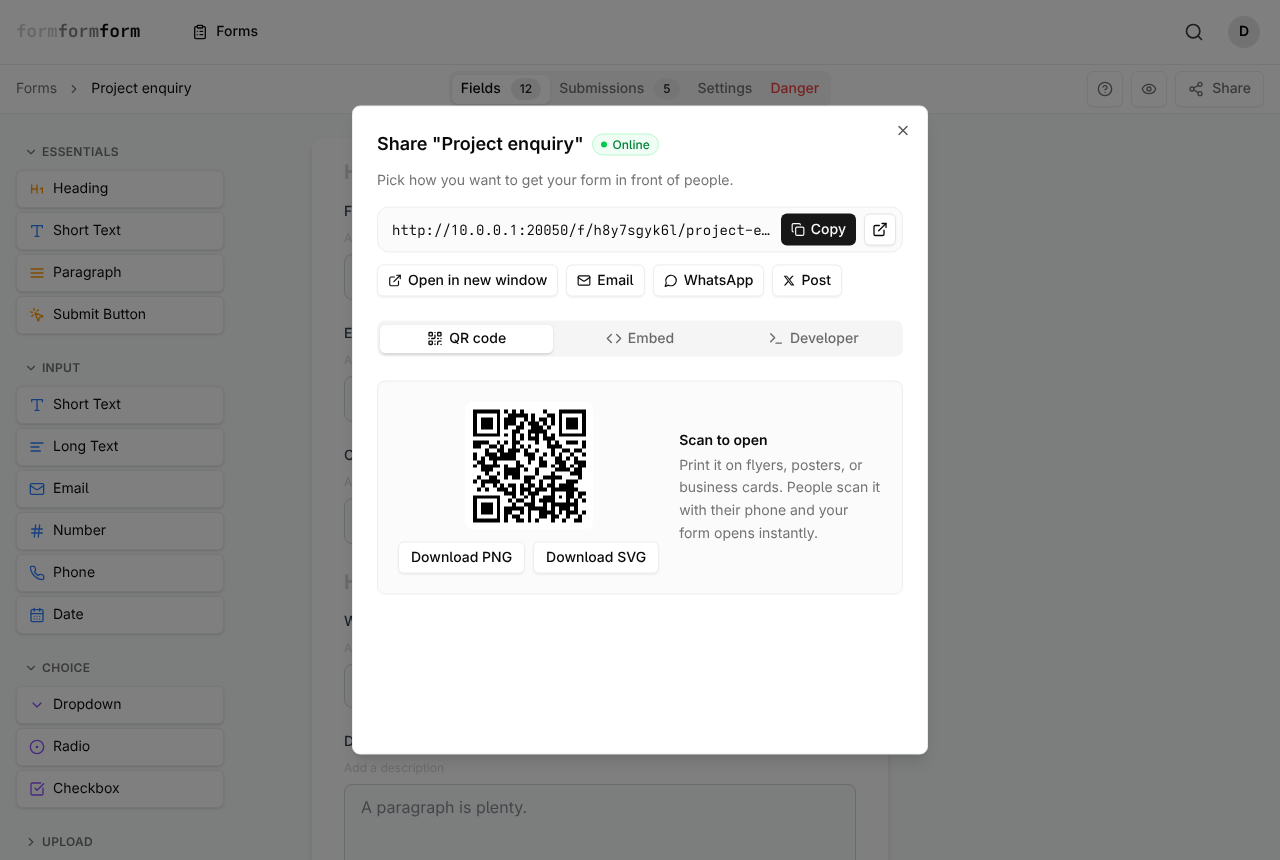
Download the code
Share opens the same dialog from two places: the button on each card in the Forms list, and the button at the top right of the editor, after the question mark and the preview eye. It opens on the QR code tab, so the code is already there under the tab row.
Read the link in the box above the tabs before you download anything. That address is exactly what the pixels encode, and paper is not editable.
- 1
Open Forms, or open the form you want in the editor.
- 2
Click Share — on the form's card, or at the top right of the editor.
- 3
Stay on the QR code tab, the first of the three below the quick-share row.
- 4
Click Download PNG for a 1024-pixel image, or Download SVG for a vector file.
- 5
Rename the file straight away. Every form downloads as qrcode.png or qrcode.svg, so a folder of them is unidentifiable.
The code is generated at the lowest error-correction level, which spends none of its capacity on redundancy. Dropping a logo in the middle, trimming the white margin, or printing it over a photograph will each stop it scanning, even though all three survive on codes built with heavier correction.
Print it at a size that scans
Send the SVG to anything a print shop handles — window vinyl, a pull-up banner, an A3 poster — because it redraws sharp at any size. The PNG is 1024 pixels square, which is right for a slide, an email footer or a table tent, and runs out at roughly 85 mm printed at 300 dpi.
Rules of thumb about millimetres of code per metre of scanning distance are easy to find and easy to get wrong for your particular wall. Test the real thing instead.
- 1
Print one copy at the final size on ordinary paper.
- 2
Tape it where the real one will go — same height, same lighting.
- 3
Scan it from where a person would actually stand, then again at arm's length.
- 4
Check that the form which opens is the one you meant before you commit to the print run.
Keep the white square the download gives you. Most scanners expect dark marks on a light ground, so a code reversed out of a dark background, or printed in a pale brand colour, often fails on older phones even when it works on yours.
What a scan opens
The camera hands the link to the phone's browser and the public form loads. No app, no account, no sign-in. Multi-page forms, conditional logic and required-field checks behave as they do on a laptop.
A File Upload field is often the whole reason a code goes on a wall: a photo of a meter reading, of a damaged parcel, of a receipt for an expenses claim. The camera roll is already in the respondent's hand.
Each file must be 2 MB or smaller, and a photo straight off a recent phone frequently is not, so ask for a smaller one in the field's description. On an encrypted form uploads are encrypted in the browser alongside the answers, and nothing that arrives can be read again if the private key is lost. A printed order form can also send the customer to secure hosted checkout after submission.
Keep a printed code working
The link reads /f/h8y7sgyk6l/project-enquiry. The middle segment is the form's public id, fixed when the form is created; the tail is a slug built from the title. Rename the form and the slug regenerates, but a scan carrying the old one redirects to the current address, so a poster printed last spring still lands in the right place.
What does strand a printed code is the switch labelled "Form is accepting submissions", on the Settings tab under Notifications. Off is not a polite closed sign: the public page returns a not-found error, and the person standing in front of your poster gets a browser error with no explanation. When a campaign ends, leave the form on and rewrite its first heading to say so.
The destination is baked into the pixels and cannot be repointed afterwards. If you might need to move it — a fresh form next season, a different team taking over — print a code for a short link you control and aim that at the form.
Frequently asked questions
How do I get a print-resolution QR code?
Use Download SVG in the Share dialog. It is vector, so it stays crisp from a business card to a shop window, and it is the file a print shop would rather have. Download PNG gives a 1024-pixel bitmap, which is about 85 mm square at 300 dpi and blurs beyond that.
Does the QR code expire or need renewing?
No. There is no static-versus-dynamic distinction here and no subscription attached to the code. It carries your form's own address, with no redirect service in between, so it keeps working for as long as the form is switched on.
How do I tell which poster a response came from?
Add a Hidden field from the Layout section of the palette and set its Label to source. Then take the form link, add ?source=window-poster or ?source=table-card for each print run, and make a code for each tagged link with any QR tool — the Download buttons always encode the plain link. The value arrives with the submission and exports with it.
Related articles
- Share a form by link
Every form has a public link from the day it is created — here is where to find it and how to send it.
- Publish a form and get its link
A form is live the moment you create it — how to check it, copy its link, and close it again.
- Hidden fields and prefilled values
Tag each response with where it came from, and start visible fields off with a value already in the box.
- Collect file uploads
Add a File Upload field, then preview or download whatever people attach from the submission page.
- Embed a form in your website
Paste one script tag to draw your form into any page, or use the iframe where scripts are stripped.
Nothing here answering your question? The editor is quick enough that trying it is often faster than reading about it.
Open the editor