Delete a response, and what that means
A test entry you made while building the form, the same enquiry sent twice because the visitor lost patience with a slow connection, a tenancy application withdrawn the same afternoon — responses get deleted for ordinary reasons. The control is a small trash icon, and it is deliberately quick to reach.
What sits behind it is not quick to reverse. There is no bin, no archive and no undo step: the response and everything attached to it go, and formformform keeps no copy on your behalf. This article covers where the control lives, what disappears with the response, and what deleting cannot touch.
Delete one row from the Submissions tab
Open a form and Submissions is the second of four tabs across the top — Fields, Submissions, Settings, Danger. From your forms list you can skip a step: the Responses button on a form's card lands on the same tab.
Every row in the table ends with a trash icon in a narrow, unlabelled last column. It asks before it acts, so a mis-aimed click costs nothing.
- 1
Open the form and click the Submissions tab.
- 2
Find the row you want. The search box above the table matches answer text, which is the fastest way to pick a duplicate out by email address.
- 3
Click the trash icon at the right-hand end of the row.
- 4
The cell turns into "Delete?" with Yes and No beside it.
- 5
Click Yes. The row goes and a short "Submission deleted" confirmation appears.
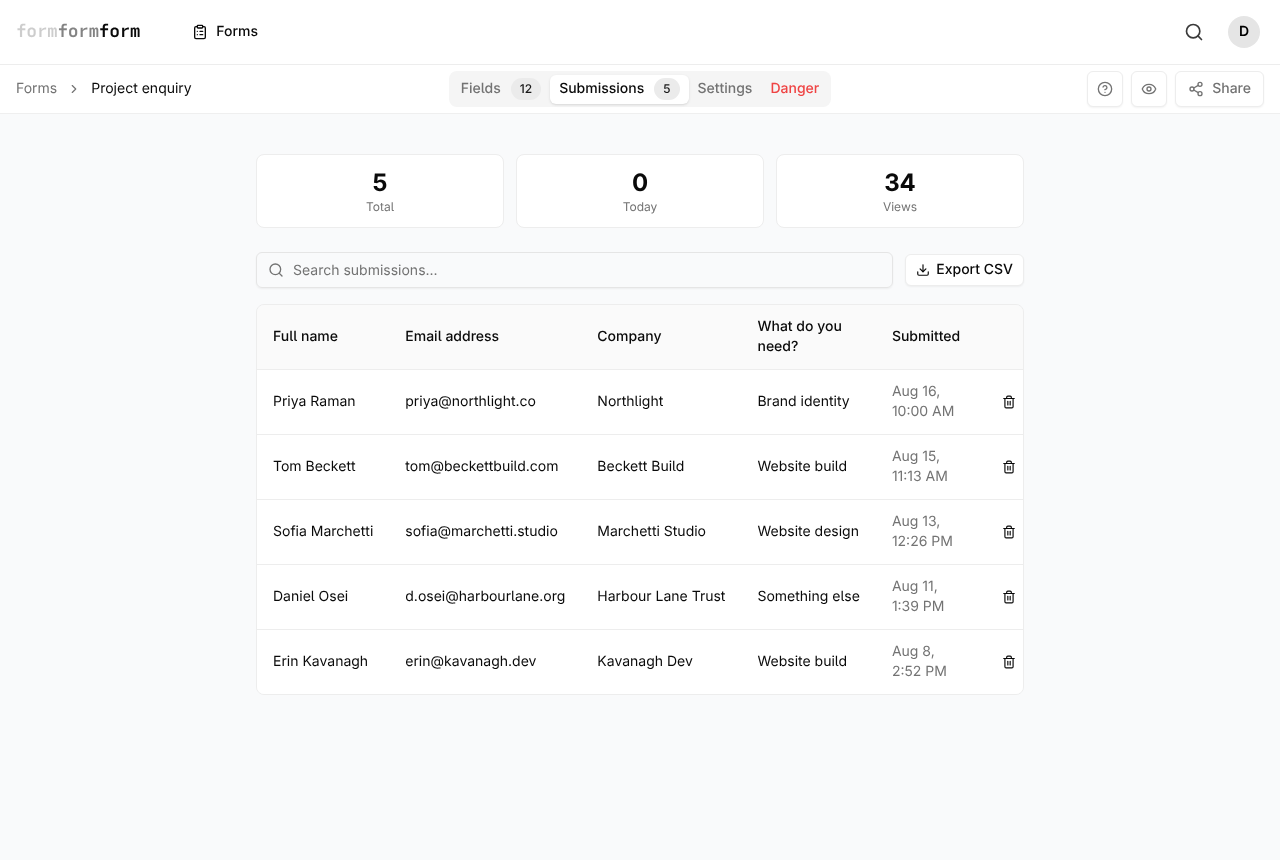
There is no multi-select and no clear-all. Rows go one at a time and each asks separately. Clicking anywhere else in the row opens the response instead.
Delete a response you already have open
Click a row and the response opens on its own page. The same trash icon sits to the right of the Submission heading and its timestamp, with the same Delete? Yes / No confirmation. Answer Yes and you land back on the Submissions tab rather than on a page that no longer exists.
This is the better route when you are working through a batch, because Newer and Older step between responses in date order — read the one either side before deciding. On an encrypted form it is the only practical route. Those rows all show a padlock and a slice of PGP ciphertext, and the search box has nothing in plain text to match, so the only way to know which response you are removing is to open it with your private key loaded.
Deleting an encrypted response removes the ciphertext for good. Losing the private key is a different problem: those responses stay in the table, unreadable, until someone deletes them.
What goes with the response
Deleting takes the whole record: every answer, the metadata block beneath them — filled time, IP address, browser — and any files the visitor attached. A photo sent to a repair booking form stops being downloadable the moment you confirm.
The counters follow. Total and Today drop by one, as does the submissions figure on the form's card in your forms list, sitting between its field and view counts. Views does not move, because a deleted response does not un-visit the page: a form reading 200 views and 12 responses still reads 200 views afterwards. Export CSV builds the file at the moment you click it, so the next export simply has one row fewer.
The attachment record goes at the same instant as the response, so its download and preview links stop resolving immediately. The stored file itself is cleared by a daily cleanup pass rather than at the moment you click Yes.
What deleting cannot reach
Everything that left formformform when the response arrived stays where it went. A webhook you fired at submission time, a Zap that appended a row to a spreadsheet, the notification email sitting in your inbox, a CSV already downloaded to a laptop — deletion touches none of them, and connected apps are told nothing when a response goes.
That matters most when a respondent asks you to erase their data. Deleting the response in formformform is one step; the rest is retracing wherever that submission was forwarded and clearing it there too.
Submissions arriving is the only event that reaches webhooks and Zaps. Deleting one sends no message anywhere, so no automation can react to it.
Clearing out more than one response
For a whole form, the Danger tab has Delete Form. The dialog names the form and says plainly that it removes the form and all submissions, and it cannot be undone — export first if the answers still have any value. Deleting your account under Settings does the same for every form you own.
If what you actually want is the same questions with an empty response list, do not delete anything. Open the menu on the form's card in your forms list and choose Duplicate. The copy carries the fields, logic and settings across and starts at zero responses; the original keeps its history until you decide otherwise. The duplicate is a new form with its own link, so update anywhere you had shared the old one.
A duplicate of an encrypted form reuses the same public key, so the private key you already hold decrypts both.
Frequently asked questions
I deleted a submission by mistake — can I get it back?
No. There is no bin, no archive and no undo, and support cannot restore it either. The only copies that survive are ones made before the deletion: a CSV export, a notification email, or whatever a webhook or Zap sent onward.
Does deleting a response delete the file someone uploaded with it?
Yes. Attachments belong to the response, so they go with it — the download and preview links stop working straight away, and the stored file is cleared by a daily cleanup pass. On an encrypted form the file was ciphertext on our side throughout.
How do I delete every response but keep the form?
One row at a time is the only way to empty an existing form; there is no bulk delete. If the count is large, duplicating the form from your forms list is usually quicker — you get the same questions on a fresh link with no responses, then delete the original once you have exported anything worth keeping.
Related articles
- Read and search your responses
Every response lands in the form's Submissions tab, where you can search it and open any one of them in full.
- Export responses to CSV
Download every response to a form as one CSV file, and know what each column holds before you open it.
- Collect file uploads
Add a File Upload field, then preview or download whatever people attach from the submission page.
- How encrypted forms work
Responses are sealed in the visitor's browser with OpenPGP and opened only by a private key you hold.
- Get an email for every submission
Send every new response to your inbox, and know what the email will and will not contain.
Nothing here answering your question? The editor is quick enough that trying it is often faster than reading about it.
Open the editor