Headings, paragraphs and dividers
Twelve questions in a row read as a wall. The same twelve, split under three headings with a line of context at the top, read as three short asks.
Headings, paragraphs and dividers are fields like any other. They sit in the palette next to Short Text and Email, and save the moment you stop typing. They never become a column in your responses, because there is nothing to answer.
Where the layout fields live
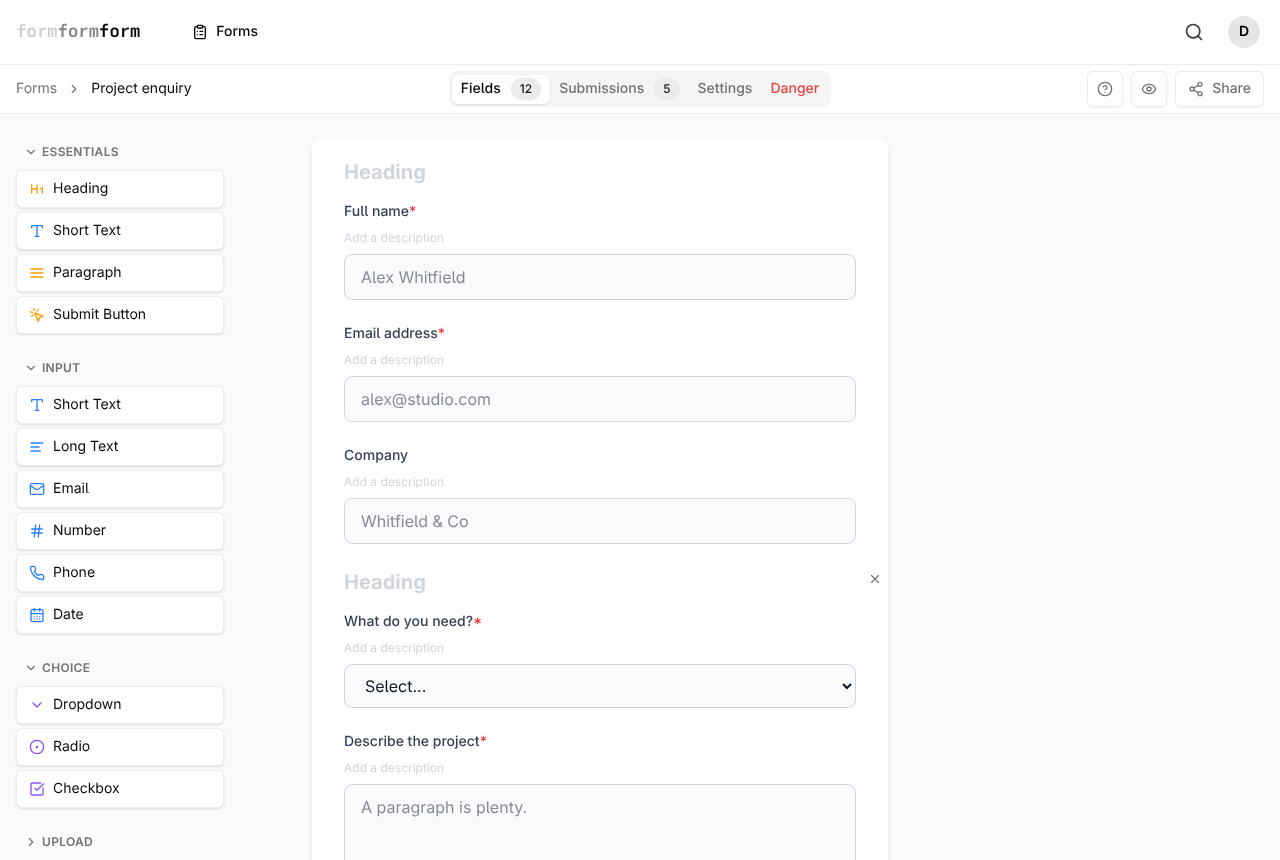
Open a form and stay on the Fields tab. On a desktop screen the palette runs down the left in collapsible groups: Essentials, Input, Choice, Upload and Layout. Heading and Paragraph appear twice — in Essentials, because almost every form wants them, and again in Layout. Divider is in Layout only, alongside Image, Page Break, Hidden and Submit Button.
In a narrow window the palette folds away behind an Add Field button above the form.
Clicking a palette item drops the new field at the very bottom — below the Submit Button, which is a field too. Drag the item into place instead, or drag the card up afterwards; the whole card is the handle.
Put a heading above each group of questions
A heading is one line of text. There is no size or style choice, which is the point: every heading matches, so a reader can see where one block ends and the next begins.
On the project enquiry form above, the first block asks who you are and the second asks about the work. Two headings do all its signposting.
- 1
Open the Layout group in the palette and drag Heading to where the new section should start. A dashed "Drop Heading here" marker shows where it will land.
- 2
Let go. The card arrives reading "Section heading" and is selected for you.
- 3
Click the heading text on the card and type over it — "Your details", "About the project".
- 4
Press Enter, or click anywhere outside the card. A "Field updated" toast confirms it saved; there is no Save button in the editor.
- 5
Repeat for each block, then use the eye icon at the top right to preview the form.
While a form still carries its default title, My new form, editing the first heading renames the form to match. Once the title is anything else, that stops.
Explain something in a paragraph
Select a Paragraph card and the Field Properties panel opens beside the form with a Content box. It takes rich text: bold, italic, underline and strikethrough; bullet and numbered lists; alignment left, centre or right; and a link button that asks for a URL. Undo and redo sit at the end of the toolbar. Edits save about half a second after you stop typing.
A paragraph earns its place when a question would otherwise need a three-line label: what happens to someone's phone number, when applications close, a link to your privacy notice.
The paragraph toolbar has no heading button, and no blockquote or code block. Anything that should look like a heading should be a Heading field, so it matches the rest.
Dividers, images and page breaks
Divider draws a plain horizontal rule and nothing else. Select one and the properties panel shows a Divider badge and no settings at all. Reach for it when two blocks belong on the same page but would run together, and a second heading would be too much.
Image, in the same group, puts a picture in the form: upload a PNG, JPEG, GIF, WebP or AVIF up to 5 MB, or paste the address of one you host elsewhere, then set Alt text.
Page Break is the heavier option: it cuts the form into pages the respondent moves through one at a time.
Layout fields take no conditional logic. The Edit Logic button appears only on fields that collect an answer, so a heading cannot be shown or hidden based on an earlier reply.
What layout text is, and isn't
Layout fields render everywhere the form does. The link, the embed and the popup all build from the same field list, so a heading added in the editor turns up in the embedded copy on your site straight away.
What they never reach is the Submissions tab or the CSV export.
The words in a heading or paragraph are part of the form, not a response. On an encrypted form it is the answers that are encrypted in the browser, so keep anything confidential out of the layout text.
Frequently asked questions
Can I make one heading bigger than another?
No. Headings render at a single size, and the paragraph toolbar has no font size or colour control. A form with four heading sizes is harder to scan than one with a single size.
Will headings and paragraphs show up in my CSV export?
No. Only fields that collect an answer become columns. Layout fields exist for the person filling the form in.
Can I put two fields side by side with a divider?
No — fields always stack in one column. You can change how wide a control is: select an input field and set Field width to Small (25%), Medium (50%), Large (75%) or Full width. The next field still starts on a new line.
Related articles
- How the form editor works
The editor has three parts — palette, form, field settings — and edits to fields save as you make them.
- Every field type, and when to use it
A tour of the palette: what each field type collects, and which one fits the answer you want back.
- Split a long form across pages
Add page breaks from the Layout palette to turn one long form into a short sequence of numbered steps.
- Show and hide fields with conditional logic
Add a rule to a field so it appears, or becomes required, only when an earlier answer calls for it.
- Required fields and validation
Turn on Required, set length, number and date limits, and require a field only when an earlier answer calls for it.
Nothing here answering your question? The editor is quick enough that trying it is often faster than reading about it.
Open the editor